


Beeper: Every Chat in One App
3.4546.00 Reviews
App Specs
- Version
- 4.55.0
- Updated On
- License
- Free
- Downloads
- 1,000,000+
- Developer
- Automattic, Inc
- Categories
- Communication
- Platform
- Android
Screenshots
 Analysis by AppCompare
If you’re like me, juggling between multiple messaging apps can be a bit of a headache. Enter Beeper: Universal Chat, the app that claims to bring all your conversations into one neat space. I decided to give it a whirl and see if it lives up to the hype. Here's the lowdown on what it's like to use Beeper in the real world.
Who benefits most from bringing chats together
I find Beeper most useful when the people I talk to are spread across different chat services and I need one place to keep track of replies. It is a communication app from Automattic, Inc, and that central-inbox approach is its main practical appeal: rather than remembering which service holds a conversation, I can look in one place and search across chats.
A realistic example is a busy day when a family group is active on one network, a friend messages through another, and a work contact writes somewhere else. Checking each original app in turn creates a small but persistent interruption. With Beeper, I can scan one inbox, answer what needs attention, and return to what I was doing. That is a modest convenience, but it can make a scattered messaging routine feel more manageable.
The trade-off is that a shared inbox can blur boundaries. I would pin only the conversations I need to reach quickly, archive threads that are no longer active, and keep notification settings deliberate. Otherwise, combining several sources can turn a cluttered set of apps into one crowded screen. The point is not to move every conversation into view at all times; it is to make the important ones easier to find.
Choosing it over separate messaging apps
Compared with opening each network’s own app, Beeper favors a common place to read and organize conversations. That is helpful when finding a message matters more than using every service’s full set of native features. Separate apps can still be the better choice if you rely on a particular network’s distinctive tools, settings, or calling experience. I treat Beeper as a convenient front door, not a guarantee that every chat service behaves identically inside it.
That distinction is worth keeping in mind before making it your only messaging destination. If a conversation is important, I would check that the relevant account is connected and that incoming messages appear as expected, rather than assuming that installing one app automatically replaces every original client. For someone who uses only one or two services, the extra layer may not be worthwhile; the native apps may already be simple enough.
Its audience numbers suggest it has found a substantial group of users: it has more than a million installs and an average rating of 3.8 from around 4,300 ratings, with 486 reviews. I would read that as evidence of interest, not a promise that every account connection will be equally smooth. The app is free to download, while in-app purchases range from $9.99 to $499.99 per item, so I would check what any purchase covers before committing to it.
Worth Reading Before You Choose

EA SPORTS FC Mobile 26 Is a Bigger Football Game, but It Takes Time

Flipboard Shows What News Apps Must Do Beyond the Feed

Switching to Android Auto Means Rethinking Your Driving Routine

Google Calendar Makes a Crowded Week Easier to Manage

Ludo King Makes the Most of the Minutes Between Plans

Baby Panda World Brings Quick Play to Modern Phones, but Its Game Library Feels Busy
The Setup Process
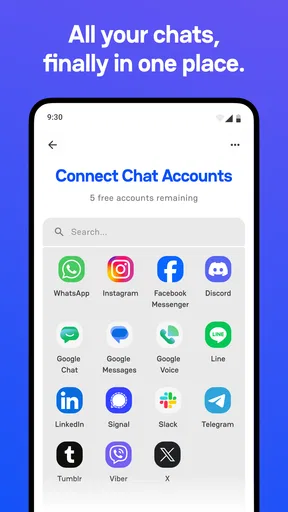
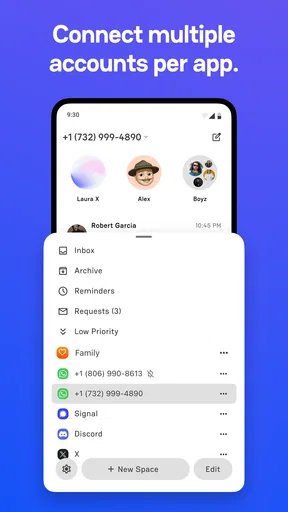
First things first, let’s talk about setting up Beeper. I downloaded the app and was pleasantly surprised by how straightforward the onboarding was. It’s kind of like having a personal assistant walk you through the steps. You connect your messaging accounts one by one. From WhatsApp to iMessage, it supports a whopping 15 different platforms. Seriously, it’s like a one-stop-shop for all your chatting needs.
Getting connected was mostly smooth sailing, though I did hit a minor snag when linking my iMessage. Not a dealbreaker, but something to keep in mind. Once everything was set up, I was ready to dive into the app itself.
User Interface and Experience
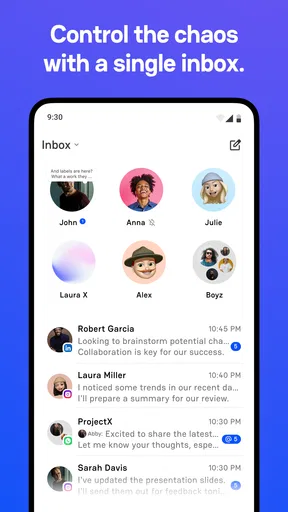
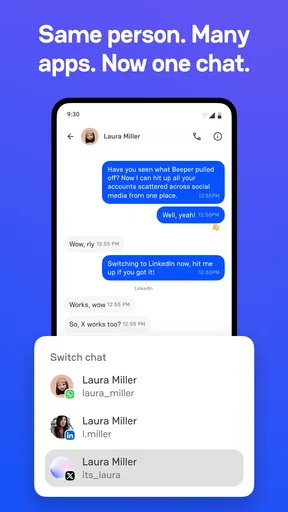
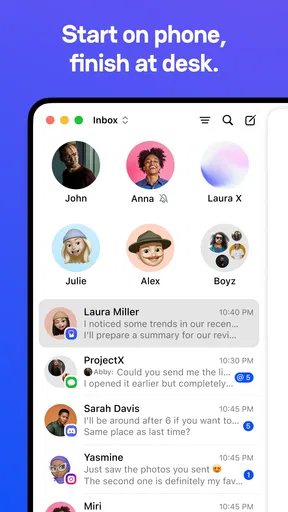
Now, let’s chat about the interface. Beeper aims for simplicity and functionality. The main screen is a unified inbox where all your messages come together. It’s pretty intuitive, and I didn’t find myself getting lost, which is a big plus. You can easily toggle between different chats, and the search function is a lifesaver when you need to dig up that one message thread from weeks ago.
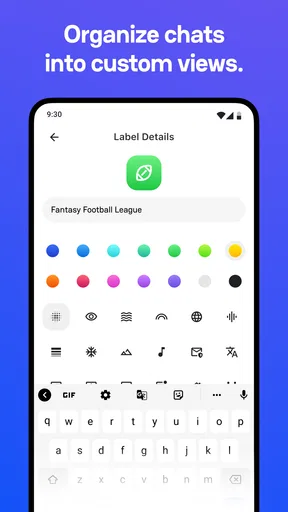
The design is clean, but not groundbreaking. It feels familiar yet fresh, kind of like a blend of Slack and your favorite messaging app. This familiarity makes the transition super smooth. If you’re someone who enjoys keeping things organized, Beeper’s got a few tricks up its sleeve with customizable options for notifications and chat pinning.
Making the inbox easier to use
For readability, I would start by pinning only the chats I genuinely need to see at a glance. A unified inbox has an obvious benefit, but it also puts messages from different parts of life side by side. A small amount of curation can make the screen feel less demanding and help important conversations stand out without requiring constant scrolling.
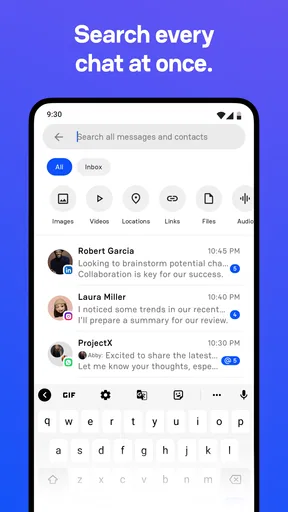
Search is especially valuable when I remember the subject of a conversation but not the service where it happened. I’d use it as a retrieval tool rather than trying to keep every thread visible: search for the detail, deal with the message, and archive a conversation when it no longer needs a place in the active inbox. That workflow makes the combined inbox feel like an aid to memory, not another feed to monitor.
Performance and Features
Alright, let’s get into the nitty-gritty of performance. The app runs smoothly, even when switching between multiple conversations. I didn’t experience any lag, which is crucial when you’re trying to keep up with fast-paced group chats.
One of the standout features is the ability to search across all chats. Imagine trying to remember which app you had that important conversation in—Beeper solves that problem. I also loved the fact that you can archive chats to declutter your inbox without losing any important info.
However, there are a few features that are still in beta, like voice and video calls. I’m optimistic that these will improve over time, but for now, the focus is primarily on text-based communication.
Where it fits into a busy day
For situational access, a single inbox can be useful during short gaps in the day: I can check what has arrived between errands or before a meeting without jumping between multiple apps. It may also help someone who switches regularly between personal and professional conversations, provided they are comfortable seeing those threads together. I would still pause before replying to make sure I’m in the right conversation, especially when several groups are active at once.
Calls deserve a separate expectation. Since voice and video calling are described as beta features in this review, I would not depend on Beeper as my only option for a time-sensitive call. If a conversation needs reliable live audio or video, opening the original messaging service—or using a dedicated calling app—may be the more sensible choice. Beeper’s strongest role here is keeping text conversations accessible in one place, not replacing every communication tool.
Privacy and Security
In today’s digital age, privacy is everything. Beeper assures users that their messages are encrypted. While that’s reassuring, it’s always smart to stay updated on how apps handle your data. My experience felt secure, and I appreciated the transparency in Beeper’s privacy policy.
Access needs and remaining friction
Consolidation can reduce the effort of remembering which app to open, which is useful when frequent app switching feels tiring or distracting. Still, a unified inbox does not automatically make every message easy to read or every interaction comfortable. If you depend on a particular service’s own controls or presentation, check whether the way you use it works well through Beeper before changing your routine.
Motor and sensory needs also vary. I would keep notifications purposeful rather than allowing every incoming chat to compete for attention, and use pinning and archiving to reduce unnecessary navigation. These are practical ways to shape the inbox, not a substitute for the specific accessibility options a person may need. If those options are central to your daily use, compare the experience with the original apps before relying on a combined client.
There is also a learning and maintenance cost: accounts have to be connected, and a problem with one connection can interrupt the convenience of having everything together. My iMessage setup snag is a reminder that the initial process may not be equally frictionless for every service. I would connect the accounts I actually use first, test them, and add others only if the single inbox genuinely saves time.
Final Thoughts
Overall, Beeper: Universal Chat is a solid choice for anyone looking to streamline their messaging experience. It’s not perfect, but the convenience it offers is a game-changer. Whether you’re a social butterfly with friends on various platforms or a professional managing multiple communications, Beeper makes life a bit easier.
Would I recommend it? Absolutely, especially if you’re tired of app-hopping. Just remember, while it consolidates your chats, it doesn’t replace the features of each individual app. It’s more of a unifying force, bringing everything into one place. So, go ahead and give it a try. It might just become your new favorite hub for staying connected.
Who should try it—and who should pass
I would suggest trying Beeper if your conversations are genuinely spread across several services and you value finding, sorting, and checking them from one inbox. It is also a reasonable option for someone who wants a single place to begin a messaging session but is happy to return to a native app when a service-specific feature matters.
I would skip it if most of your contacts already use one service, if you depend heavily on the individual tools in each original app, or if managing connected accounts adds more effort than it saves. The same goes for anyone who needs a dependable calling workflow above all else: the beta status of voice and video calls makes it wiser to keep another option available.
The app is rated for Teen users, and its current version is 4.40.0, with Android 8.0 listed as the minimum operating-system requirement. Those details help set expectations about basic compatibility, but my practical advice is still to test your own most important conversations before making Beeper the center of your routine. For an inclusive experience, the best choice is the one that fits how you read, navigate, and communicate day to day.
A measured recommendation
My verdict is positive, with a clear condition: Beeper is most compelling when the problem is fragmentation, not when you need a perfect replacement for every messaging app. Its unified inbox, cross-chat search, pinning, and archiving can make everyday communication easier to manage, while account setup and differences between services remain real considerations.
I’d begin with a few frequently used accounts, adjust notifications, and try the search and archive workflow before adding everything. If that small test reduces app-hopping without making messages harder to access, the app is doing something useful for you. If it creates extra steps or leaves you returning to the original apps for essential functions, there is no reason to force the switch. That balance is what makes Beeper worth considering—and what keeps my recommendation honest.
Pros
- Integrates multiple chat apps seamlessly.
- Customizable notifications for each platform.
- Unified search across all chat histories.
- Supports end-to-end encryption for privacy.
- Cross-platform support including desktop.
Cons
- Initial setup can be time-consuming.
- Occasional sync delays with some apps.
- Limited support for video calls.
- Some apps require workarounds to connect.
- Resource-intensive on older devices.
FAQs for Beeper: Every Chat in One App
What is Beeper: Universal Chat and how does it work?
Beeper is a universal chat application that consolidates multiple messaging platforms into a single interface. It allows users to connect accounts from various services like WhatsApp, iMessage, Facebook Messenger, and more. By centralizing your chats, Beeper aims to streamline communication, reduce app-switching, and enhance message management.
Is Beeper secure and how does it handle my data?
Beeper places a strong emphasis on security by employing end-to-end encryption for supported platforms. The app uses secure servers to manage message synchronization and storage. However, users should review the privacy policy to understand how data is handled and ensure it aligns with their privacy preferences.
Which messaging platforms are supported by Beeper?
Beeper supports over a dozen messaging platforms, including popular ones like WhatsApp, iMessage, Facebook Messenger, Slack, Telegram, and Signal. The app continuously works on integrating additional services to expand its compatibility and provide a more comprehensive messaging experience.
Does Beeper require a subscription, and what are the costs involved?
Beeper operates on a subscription-based model to support its services. Users can explore various pricing tiers, each offering different features and levels of support. A free trial may be available for new users to evaluate the app's capabilities before committing to a subscription.
Can I use Beeper on multiple devices simultaneously?
Yes, Beeper supports multi-device usage, allowing users to access their chats on various devices. This feature ensures that conversations are synchronized across platforms, offering flexibility and convenience by enabling users to seamlessly switch between their phone, tablet, and computer.


